"""
Stock Details Generator - V2.0
A desktop application to fetch live stock prices and export them to Excel.
Changes from V1.0:
- Replaced dead Google Finance scraping with yfinance
- Fixed GUI freeze - network calls run in a background thread
- Fixed scrollbar (was never connected)
- Switched from place() to grid() layout
- Added file-picker dialogs for stock list and Excel file
- Added Cancel button to abort long-running fetches
- Added menu bar (File, Help)
- Added proper error dialogs via messagebox
- Replaced wildcard import with explicit imports
- Updated copyright to 2026, version to V2.0
"""
import json
import threading
import queue
import tkinter as tk
from tkinter import ttk, messagebox
from pathlib import Path
from stock_fetcher import (
StockFetcher, load_config, BASE_DIR, BUNDLE_DIR,
INDEX_NAMES, DEFAULT_INDEX, logger,
)
# ---------------------------------------------------------------------------
# Constants
# ---------------------------------------------------------------------------
APP_TITLE = "Stock Details Generator V2.0"
APP_SIZE = "520x580"
CONFIG_PATH = BASE_DIR / "config.json"
# ---------------------------------------------------------------------------
# Application
# ---------------------------------------------------------------------------
class StockApp(tk.Tk):
"""Main application window."""
def __init__(self):
super().__init__()
self.title(APP_TITLE)
self.geometry(APP_SIZE)
self.resizable(False, False)
self.configure(bg="#F5F5F5")
# Try to set icon
icon_path = BASE_DIR / "stock_market.ico"
if icon_path.exists():
try:
self.iconbitmap(str(icon_path))
except tk.TclError:
pass
# State
self.config_data = load_config()
self.fetcher = None
self._worker_thread = None
self._progress_queue = queue.Queue()
self._is_running = False
# Build UI
self._build_menu()
self._build_widgets()
# Protocol for window close
self.protocol("WM_DELETE_WINDOW", self._on_close)
# ------------------------------------------------------------------
# Menu bar
# ------------------------------------------------------------------
def _build_menu(self):
menubar = tk.Menu(self)
# File menu
file_menu = tk.Menu(menubar, tearoff=0)
file_menu.add_command(
label="Open Config (config.json)",
command=self._open_config,
)
file_menu.add_separator()
file_menu.add_command(label="Exit", command=self._on_close)
menubar.add_cascade(label="File", menu=file_menu)
# Help menu
help_menu = tk.Menu(menubar, tearoff=0)
help_menu.add_command(label="About", command=self._show_about)
menubar.add_cascade(label="Help", menu=help_menu)
self.config(menu=menubar)
# ------------------------------------------------------------------
# Widgets - grid layout
# ------------------------------------------------------------------
def _build_widgets(self):
pad = {"padx": 12, "pady": 4}
# --- Row 0: Index selector ---
index_frame = ttk.LabelFrame(self, text="NSE Index", padding=8)
index_frame.grid(row=0, column=0, sticky="ew", padx=12, pady=(12, 4))
index_frame.columnconfigure(1, weight=1)
ttk.Label(index_frame, text="Select Index:", font=("Segoe UI", 10)).grid(
row=0, column=0, sticky="w"
)
self.index_var = tk.StringVar(value=DEFAULT_INDEX)
index_combo = ttk.Combobox(
index_frame,
textvariable=self.index_var,
values=INDEX_NAMES,
state="readonly",
width=18,
font=("Segoe UI", 10),
)
index_combo.grid(row=0, column=1, sticky="w", padx=(10, 0))
self.index_info_var = tk.StringVar(value=self._index_info(DEFAULT_INDEX))
ttk.Label(
index_frame, textvariable=self.index_info_var,
foreground="#555555", font=("Segoe UI", 9),
).grid(row=1, column=0, columnspan=2, sticky="w", pady=(4, 0))
# Update info label when selection changes
index_combo.bind("<<ComboboxSelected>>",
lambda _: self.index_info_var.set(self._index_info(self.index_var.get())))
# Excel output path label
ttk.Label(index_frame, text="Excel File:", font=("Segoe UI", 10)).grid(
row=2, column=0, sticky="w", pady=(6, 0)
)
self.excel_path_var = tk.StringVar(value=str(self.config_data["excel_file"]))
ttk.Label(
index_frame, textvariable=self.excel_path_var,
foreground="#0055AA", font=("Segoe UI", 9), wraplength=340,
).grid(row=2, column=1, sticky="w", padx=(10, 0), pady=(6, 0))
# --- Row 1: Buttons ---
btn_frame = ttk.Frame(self)
btn_frame.grid(row=1, column=0, pady=8)
self.generate_btn = ttk.Button(
btn_frame,
text="Generate Stock Details",
command=self._on_generate,
)
self.generate_btn.pack(side=tk.LEFT, padx=6)
self.cancel_btn = ttk.Button(
btn_frame,
text="Cancel",
command=self._on_cancel,
state=tk.DISABLED,
)
self.cancel_btn.pack(side=tk.LEFT, padx=6)
# --- Row 2: Status label ---
self.status_var = tk.StringVar(value="Ready - click Generate to begin.")
self.status_label = ttk.Label(
self, textvariable=self.status_var, wraplength=480, anchor="center",
font=("Segoe UI", 10),
)
self.status_label.grid(row=2, column=0, **pad)
# --- Row 3: Progress bar ---
progress_frame = ttk.Frame(self)
progress_frame.grid(row=3, column=0, **pad, sticky="ew")
progress_frame.columnconfigure(0, weight=1)
self.progressbar = ttk.Progressbar(
progress_frame, length=400, mode="determinate"
)
self.progressbar.grid(row=0, column=0, sticky="ew")
self.progressbar["value"] = 0
self.progress_pct_var = tk.StringVar(value="0 %")
ttk.Label(progress_frame, textvariable=self.progress_pct_var, width=6).grid(
row=0, column=1, padx=(8, 0)
)
# --- Row 4: Results listbox with scrollbar ---
list_frame = ttk.LabelFrame(self, text="Results", padding=4)
list_frame.grid(row=4, column=0, sticky="nsew", padx=12, pady=4)
list_frame.columnconfigure(0, weight=1)
list_frame.rowconfigure(0, weight=1)
self.scrollbar = ttk.Scrollbar(list_frame, orient=tk.VERTICAL)
self.stock_list = tk.Listbox(
list_frame,
yscrollcommand=self.scrollbar.set,
bg="#FAFAFA",
fg="#1a1a2e",
selectbackground="#0078D7",
width=60,
height=14,
font=("Consolas", 10),
borderwidth=1,
relief="solid",
)
self.scrollbar.config(command=self.stock_list.yview)
self.stock_list.grid(row=0, column=0, sticky="nsew")
self.scrollbar.grid(row=0, column=1, sticky="ns")
# Initial info
from pathlib import Path as _Path
_desktop_xlsx = _Path.home() / "Desktop" / "Share Analysis.xlsx"
self.stock_list.insert(tk.END, " Welcome to Stock Details Generator V2.0")
self.stock_list.insert(tk.END, "")
self.stock_list.insert(tk.END, " 1. Choose an NSE index (Nifty 50 / 200 / 500)")
self.stock_list.insert(tk.END, " 2. Click 'Generate Stock Details' to fetch live prices")
self.stock_list.insert(tk.END, " 3. Stock list is downloaded live from NSE India")
self.stock_list.insert(tk.END, "")
self.stock_list.insert(tk.END, " Excel will be saved to:")
self.stock_list.insert(tk.END, " " + str(_desktop_xlsx))
self.stock_list.insert(tk.END, "")
self.stock_list.insert(tk.END, " If the file doesn't exist it will be created")
self.stock_list.insert(tk.END, " automatically with all stocks pre-filled.")
# --- Row 5: Copyright ---
ttk.Label(
self,
text="\u00a9 2020-2026 Mohan K V | V2.0",
font=("Segoe UI", 8),
foreground="#888888",
).grid(row=5, column=0, pady=(4, 8))
# Let row 4 (listbox) expand
self.rowconfigure(4, weight=1)
self.columnconfigure(0, weight=1)
# ------------------------------------------------------------------
# Menu actions
# ------------------------------------------------------------------
@staticmethod
def _index_info(name: str) -> str:
"""Short description shown below the combobox."""
_desc = {
"Nifty 50": "Top 50 large-cap companies — ~50 stocks",
"Nifty 200": "Top 200 large & mid-cap companies — ~200 stocks",
"Nifty 500": "Top 500 large, mid & small-cap companies — ~500 stocks",
}
return _desc.get(name, "")
def _open_config(self):
"""Open config.json in the default text editor."""
import os
import subprocess
cfg = CONFIG_PATH
if cfg.exists():
if hasattr(os, "startfile"):
os.startfile(str(cfg)) # Windows
else:
subprocess.Popen(["xdg-open", str(cfg)]) # Linux/Mac
else:
messagebox.showwarning("Config Not Found", "config.json not found at:\n" + str(cfg))
def _show_about(self):
messagebox.showinfo(
"About",
APP_TITLE + "\n\n"
"Fetches live Indian stock prices via yfinance\n"
"and exports them to an Excel workbook.\n\n"
"Indices supported: Nifty 50 | Nifty 200 | Nifty 500\n"
"Stock lists downloaded live from NSE India.\n"
"Data source: Yahoo Finance (via yfinance)\n\n"
"\u00a9 2020-2026 Mohan K V",
)
# ------------------------------------------------------------------
# Generate - background thread + polling
# ------------------------------------------------------------------
def _on_generate(self):
if self._is_running:
return
self._is_running = True
self.generate_btn.config(state=tk.DISABLED)
self.cancel_btn.config(state=tk.NORMAL)
self.progressbar["value"] = 0
self.progress_pct_var.set("0 %")
self.stock_list.delete(0, tk.END)
self.status_var.set(f"Fetching {self.index_var.get()} prices from NSE... Please wait.")
self.status_label.configure(foreground="#333333")
# Create fetcher with current config and selected index
self.fetcher = StockFetcher(self.config_data, index_name=self.index_var.get())
# Start background worker
self._worker_thread = threading.Thread(target=self._worker, daemon=True)
self._worker_thread.start()
# Start polling queue
self._poll_progress()
def _worker(self):
"""Runs in background thread - fetches prices then saves."""
try:
for progress in self.fetcher.fetch_all():
self._progress_queue.put(("progress", progress))
result = self.fetcher.save_to_excel()
self._progress_queue.put(("done", result))
except FileNotFoundError as exc:
self._progress_queue.put(("error", "File not found:\n" + str(exc)))
except ValueError as exc:
self._progress_queue.put(("error", "Configuration error:\n" + str(exc)))
except Exception as exc:
logger.exception("Unexpected error in worker thread")
self._progress_queue.put(("error", "Unexpected error:\n" + str(exc)))
def _poll_progress(self):
"""Polls the queue from the main thread to update the GUI."""
try:
while True:
msg_type, payload = self._progress_queue.get_nowait()
if msg_type == "progress":
self.progressbar["value"] = payload
self.progress_pct_var.set(str(payload) + " %")
elif msg_type == "done":
self._on_fetch_complete(payload)
return
elif msg_type == "error":
self._on_fetch_error(payload)
return
except queue.Empty:
pass
# Keep polling every 100ms
if self._is_running:
self.after(100, self._poll_progress)
def _on_fetch_complete(self, result):
"""Called on main thread when fetch+save is done."""
self._is_running = False
self.generate_btn.config(state=tk.NORMAL)
self.cancel_btn.config(state=tk.DISABLED)
self.progressbar["value"] = 100
self.progress_pct_var.set("100 %")
self.stock_list.delete(0, tk.END)
excel_path = str(self.fetcher.excel_file)
if result.get("ResponseStatus") == "True":
self.status_var.set("Retrieved all stock details successfully!")
self.status_label.configure(foreground="#008000")
count = len(self.fetcher.stock_prices)
self.stock_list.insert(tk.END, " " + str(count) + " stocks updated in Excel")
self.stock_list.insert(tk.END, " Saved to: " + excel_path)
self.stock_list.insert(tk.END, "")
for ticker, price in self.fetcher.stock_prices.items():
line = " " + ticker.ljust(25) + " Rs. " + str(price)
self.stock_list.insert(tk.END, line)
else:
failed = {k: v for k, v in result.items() if k != "ResponseStatus"}
success_count = len(self.fetcher.stock_prices)
fail_count = len(failed)
self.status_var.set(
"Partial success - " + str(success_count) + " fetched, " + str(fail_count) + " failed"
)
self.status_label.configure(foreground="#E74C3C")
self.stock_list.insert(tk.END, " Saved to: " + excel_path)
self.stock_list.insert(tk.END, "")
self.stock_list.insert(tk.END, " -- Successfully fetched --")
for ticker, price in self.fetcher.stock_prices.items():
line = " [OK] " + ticker.ljust(25) + " Rs. " + str(price)
self.stock_list.insert(tk.END, line)
self.stock_list.insert(tk.END, "")
self.stock_list.insert(tk.END, " -- Failed to fetch --")
for i, (name, reason) in enumerate(failed.items(), 1):
line = " [FAIL] " + str(i) + ") " + name + ": " + reason
self.stock_list.insert(tk.END, line)
# Offer to open the Excel file
if messagebox.askyesno(
"Open Excel?",
"Stock prices saved to:\n" + excel_path + "\n\nOpen it now in Excel?"
):
import os
os.startfile(excel_path)
def _on_fetch_error(self, error_msg):
"""Called on main thread when an error occurs."""
self._is_running = False
self.generate_btn.config(state=tk.NORMAL)
self.cancel_btn.config(state=tk.DISABLED)
self.status_var.set("Error occurred - see details below.")
self.status_label.configure(foreground="#E74C3C")
self.stock_list.delete(0, tk.END)
for line in error_msg.split("\n"):
self.stock_list.insert(tk.END, " " + line)
messagebox.showerror("Error", error_msg)
# ------------------------------------------------------------------
# Cancel
# ------------------------------------------------------------------
def _on_cancel(self):
if self.fetcher and self._is_running:
self.fetcher.request_cancel()
self.status_var.set("Cancelling...")
self.cancel_btn.config(state=tk.DISABLED)
logger.info("Cancel requested by user.")
# ------------------------------------------------------------------
# Window close
# ------------------------------------------------------------------
def _on_close(self):
if self._is_running:
if not messagebox.askyesno(
"Confirm Exit",
"Stock fetching is in progress.\nAre you sure you want to exit?",
):
return
if self.fetcher:
self.fetcher.request_cancel()
self.destroy()
# ---------------------------------------------------------------------------
# Entry point
# ---------------------------------------------------------------------------
if __name__ == "__main__":
app = StockApp()
app.mainloop()
# ------------------- TO PUBLISH THIS APPLICATION -------------------------
# pip install pyinstaller
# Then go to your program's directory and run:
#
# Single exe:
# pyinstaller --onefile --noconsole --icon=stock_market.ico --name "StockDetailsGenerator V2.0" StockDetailsGenerator.py
#
# Include data files:
# pyinstaller --onefile --noconsole --icon=stock_market.ico --add-data "config.json;." --add-data "StockUrls.csv;." --name "StockDetailsGenerator V2.0" StockDetailsGenerator.py
Stock Details Generator V2.0
A free Python desktop application for Windows • Fetches live NSE stock prices via Yahoo Finance • Last updated: April 5, 2026
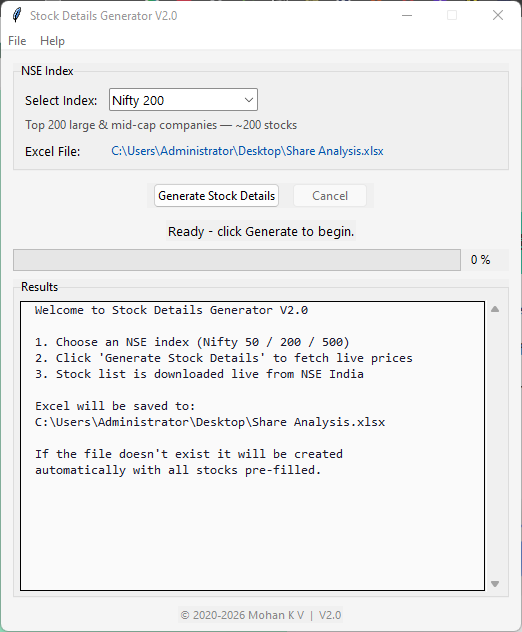
Stock Details Generator V2.0 is a free Python desktop application built with Tkinter that fetches live Indian stock prices from Yahoo Finance (via yfinance) and exports them to a beautifully formatted Excel workbook. Choose from Nifty 50, Nifty 200, or Nifty 500 indices — the constituent stock list is downloaded directly from NSE India at runtime, so no local CSV files are needed.
Tech Stack
Python 3.10+
Tkinter
yfinance
openpyxl
requests
PyInstaller
What's New in V2.0
NEW NSE Index Selector — Choose Nifty 50, Nifty 200, or Nifty 500 directly in the GUI dropdown
NEW Live Constituent List — Stock list downloaded from NSE India at runtime; no local
StockUrls.csv neededNEW Auto Excel Template — Creates
Share Analysis.xlsx on your Desktop automatically; recreates when the index changesNEW Cancel Button — Abort long-running fetch operations gracefully
NEW Menu Bar — File → Open Config, Help → About for quick access
NEW config.json — All settings configurable via a JSON file (Excel path, retries, timeout, etc.)
NEW Retry Logic — Automatic retries with configurable delay on failed price fetches
NEW Logging — Detailed logging to
stock_generator.log for debuggingKey Features
- Live NSE Stock Prices — Fetches current prices for Nifty 50, 200, or 500 stocks via Yahoo Finance
- Auto-Generated Excel Workbook — 10-column layout with stock names, sectors, prices, P&L formulas, and colour-coded cells
- Progress Bar & Real-time Results — See fetch progress and stock prices as they come in
- Non-blocking GUI — Network calls run in a background thread; the window remains responsive
- Cancel Support — Abort a running fetch operation at any time
- Configurable Settings — Edit
config.jsonfor Excel path, sheet name, retries, timeout, and more - Extra Save Paths — Save backup copies of the workbook to additional locations
- PyInstaller Ready — Build a single standalone
.exefor distribution
Excel Template Layout
The generated workbook (Share Analysis.xlsx, sheet Future Sight) has 10 columns:
| Col | Header | Content |
|---|---|---|
| A | NSE Stocks | Company display name |
| B | CODE | Bare NSE ticker (e.g. HDFCBANK) |
| C | Sector | Pre-filled from NSE industry classification |
| D | Current Value | Price written here on every fetch |
| E | Share Quantity | Default 100 (edit freely) |
| F | Buying Amount | =D*E |
| G | Expected Price | Fill manually — your target sell price |
| H | Selling Amount | =IF(G="","",G*E) |
| I | Profit / Loss | =IF(F=0,"",H-F) |
| J | Profit / Loss % | =IF(F=0,"",((H-F)/F)*100) |
Tip: The template is automatically recreated when you switch indices (e.g. Nifty 200 → Nifty 500), so all rows are always in sync with the fetched prices.
- Setup & Usage Instructions for Windows PC -
Prerequisites
- Python 3.10 or later — Download from python.org. Make sure to check "Add Python to PATH" during installation.
- pip — Comes pre-installed with Python. Used to install the required packages.
- Internet connection — Required to download the NSE stock list and fetch live prices from Yahoo Finance.
Step 1 — Install Python
Download and install Python 3.10+ from the official site. During installation, make sure to check the box "Add Python to PATH".
Download and install Python 3.10+ from the official site. During installation, make sure to check the box "Add Python to PATH".
Step 2 — Download the source files
Switch to the "Code" tab above and download both Python files:
Switch to the "Code" tab above and download both Python files:
- Click Download StockDetailsGenerator.py (main GUI application)
- Click Download stock_fetcher.py (core fetch & Excel logic)
C:\StockDetailsGenerator\).
Step 3 — Create a virtual environment (recommended)
Open Command Prompt or PowerShell, navigate to the folder, and run:
Open Command Prompt or PowerShell, navigate to the folder, and run:
python -m venv .venv
.venv\Scripts\activate
Step 4 — Install dependencies
With the virtual environment activated, install the required packages:
With the virtual environment activated, install the required packages:
pip install yfinance openpyxl requests
Step 5 — Create config.json (optional)
Create a
Create a
config.json file in the same folder to customise settings. If you skip this step, the app will use sensible defaults. Example:
{
    "excel_file": "C:\\Users\\YourName\\Desktop\\Share Analysis.xlsx",
    "excel_sheet": "Future Sight",
    "stock_code_column": 2,
    "stock_price_column": 4,
    "extra_save_paths": [],
    "request_timeout": 20,
    "max_retries": 3,
    "retry_delay": 2,
    "log_file": "stock_generator.log"
}
Step 6 — Run the application
Double-click
Double-click
StockDetailsGenerator.py or run from the terminal:
python StockDetailsGenerator.py
Step 7 — Select an NSE Index
In the GUI, use the dropdown to select Nifty 50, Nifty 200, or Nifty 500. Each option shows a description of how many stocks will be fetched.
In the GUI, use the dropdown to select Nifty 50, Nifty 200, or Nifty 500. Each option shows a description of how many stocks will be fetched.
Step 8 — Generate stock details
Click "Generate Stock Details". The app will:
Click "Generate Stock Details". The app will:
- Download the official constituent list from NSE India
- Fetch the current price for every stock via Yahoo Finance
- Write all prices to
Share Analysis.xlsxon your Desktop
Step 9 — Monitor progress
The progress bar and results list update in real time. Each fetched stock and its price appears in the results panel. Use the Cancel button if you need to stop mid-fetch.
The progress bar and results list update in real time. Each fetched stock and its price appears in the results panel. Use the Cancel button if you need to stop mid-fetch.
Step 10 — View results in Excel
Once complete, the app asks whether to open the Excel file. The workbook contains all fetched stock prices with pre-filled sectors, formulas for buying amount, selling amount, profit/loss, and profit/loss %.
Once complete, the app asks whether to open the Excel file. The workbook contains all fetched stock prices with pre-filled sectors, formulas for buying amount, selling amount, profit/loss, and profit/loss %.
Pro Tips
- Start with Nifty 50 for a quick test (~50 stocks), then try Nifty 200 or 500 for broader coverage
- The Excel template is auto-recreated when you switch indices, so you always get the correct number of rows
- Use File → Open Config in the menu bar to quickly edit
config.json - To build a standalone
.exe, install PyInstaller and run:
pyinstaller --onefile --noconsole --icon=stock_market.ico --name "StockDetailsGenerator V2.0" StockDetailsGenerator.py
Configuration Reference
| Setting | Description |
|---|---|
excel_file | Path to the Excel workbook (auto-created on Desktop if missing) |
excel_sheet | Sheet name inside the workbook |
stock_code_column | Column number (1-based) containing ticker codes |
stock_price_column | Column number (1-based) where prices are written |
extra_save_paths | Additional paths to save backup copies of the workbook |
request_timeout | Seconds to wait for NSE/Yahoo Finance requests |
max_retries | Retry attempts per stock on failure |
retry_delay | Seconds between retries |
log_file | Log file name for debugging output |
Download Source Files
Download the Python source files and save them in the same folder
Download StockDetailsGenerator.py Download stock_fetcher.pyThis project consists of two Python files. Use the buttons below to switch between them: