<#
.SYNOPSIS
WebP Converter V3.0
.DESCRIPTION
Converts images (JPG, PNG, TIFF, HEIC) to WebP format.
Supports single file, folder batch, and drag-and-drop input.
Includes optional image resizing and HEIC intermediate conversion.
.AUTHOR
Mohan KV (Trek Traveller)
.VERSION HISTORY
-------------------------------------------------------------------------
V2.0 (Original)
-------------------------------------------------------------------------
- Basic image-to-WebP conversion (JPG, PNG, TIFF, HEIC)
- Single file and folder batch modes
- Quality slider (0-100)
- cwebp.exe path auto-detection with custom path override
- Simple progress bar with status label
- HEIC support via intermediate TIFF conversion (requires Windows
HEIF Extensions from Microsoft Store)
- Drag and drop support for single file or folder
-------------------------------------------------------------------------
V3.0 | March 14, 2026
-------------------------------------------------------------------------
NEW FEATURES:
- [Async Processing] Replaced blocking DoEvents() loop with PowerShell
Runspace + DispatcherTimer for true background
processing — UI stays fully responsive during
batch conversions
- [Cancel Button] Added "Cancel" button to stop an in-progress
conversion gracefully; shows count of files
processed before cancellation; resets all UI
to Ready state cleanly after dismissing dialog
- [Time Remaining] Live estimated time remaining displayed below
the progress bar, calculated from average time
per file (shows "Calculating..." on first file)
- [Image Resizing] New "Resize Options" panel with configurable
Max Width / Max Height fields; maintains aspect
ratio using the same two-step algorithm as
industry-standard web compressors — this is the
primary reason output can reach ~500 KB from a
12 MB source image
- [Resize Presets] One-click preset buttons: 4K (3840x2160),
FHD (1920x1080), HD (1280x720), Web (1024x768)
- [Multi-file Drop] Drag and drop multiple files at once; auto-
switches to folder mode and queues all dropped
files for conversion
- [Better Validation] Actionable error messages for missing cwebp.exe
(with download link), missing folders/files,
HEIC codec, and invalid resize dimensions
- [Case-insensitive] File browser now shows images with uppercase
extensions (.JPG, .JPEG, .PNG, etc.) correctly
- [Error Summary] Completion dialog lists up to 5 individual file
errors with details instead of just the last one
- [Process Disposal] cwebp Process objects properly disposed via
try/finally to prevent handle/memory leaks
- [Stderr Fix] StandardError read before WaitForExit() to
prevent deadlock on large error output buffers
- [Min Window Size] Window cannot be resized below 650x790 — prevents
UI controls from being clipped or hidden
-------------------------------------------------------------------------
#>
# 1. Load Assemblies
Add-Type -AssemblyName PresentationFramework, System.Drawing, System.Windows.Forms, System
# 2. HELPER: Find cwebp
function Find-Cwebp {
# --- USER CUSTOM PATH ---
$customPath = "C:\Users\Administrator\Desktop\WebPConverter\libwebp-1.3.0-windows-x64\libwebp-1.3.0-windows-x64\bin\cwebp.exe"
if (Test-Path $customPath) { return $customPath }
# Fallback search
$scriptPath = $PSScriptRoot
if ($scriptPath -and (Test-Path "$scriptPath\cwebp.exe")) { return "$scriptPath\cwebp.exe" }
try {
$cmd = Get-Command cwebp -ErrorAction SilentlyContinue
if ($cmd) { return $cmd.Source }
} catch {}
$searchPaths = @(
"$env:ProgramFiles\libwebp\bin",
"${env:ProgramFiles(x86)}\libwebp\bin",
"$env:USERPROFILE\Downloads"
)
foreach ($path in $searchPaths) {
if (Test-Path "$path\cwebp.exe") { return "$path\cwebp.exe" }
}
return $null
}
# 3. GUI LAYOUT (XAML)
[xml]$xaml = @"
<Window xmlns="http://schemas.microsoft.com/winfx/2006/xaml/presentation"
xmlns:x="http://schemas.microsoft.com/winfx/2006/xaml"
Title="WebP Converter" Height="790" Width="650"
WindowStartupLocation="CenterScreen" ResizeMode="CanResizeWithGrip"
MinWidth="650" MinHeight="790"
Background="#F0F0F0" AllowDrop="True">
<Window.Resources>
<Style TargetType="Button">
<Setter Property="Padding" Value="10,5"/>
<Setter Property="Margin" Value="5"/>
<Setter Property="Background" Value="#DDDDDD"/>
</Style>
<Style TargetType="GroupBox">
<Setter Property="Margin" Value="10"/>
<Setter Property="Padding" Value="10"/>
<Setter Property="BorderBrush" Value="#AAAAAA"/>
<Setter Property="Background" Value="White"/>
</Style>
<Style TargetType="TextBox">
<Setter Property="VerticalContentAlignment" Value="Center"/>
<Setter Property="Padding" Value="2"/>
<Setter Property="Height" Value="24"/>
</Style>
</Window.Resources>
<Grid>
<Grid.RowDefinitions>
<RowDefinition Height="Auto"/>
<RowDefinition Height="Auto"/>
<RowDefinition Height="Auto"/>
<RowDefinition Height="Auto"/>
<RowDefinition Height="Auto"/>
<RowDefinition Height="*"/>
<RowDefinition Height="Auto"/>
</Grid.RowDefinitions>
<!-- Header -->
<TextBlock Grid.Row="0" Text="WebP Image Converter" FontSize="18"
FontWeight="Bold" Margin="15,15,15,5" Foreground="#333333"/>
<TextBlock Grid.Row="0" Text="Drag and drop files/folders here"
FontSize="11" Foreground="#666666" Margin="15,40,15,5"
FontStyle="Italic"/>
<!-- Config -->
<GroupBox Grid.Row="1" Header="Configuration">
<Grid>
<Grid.ColumnDefinitions>
<ColumnDefinition Width="Auto"/>
<ColumnDefinition Width="*"/>
<ColumnDefinition Width="Auto"/>
</Grid.ColumnDefinitions>
<Grid.RowDefinitions>
<RowDefinition Height="Auto"/>
<RowDefinition Height="Auto"/>
</Grid.RowDefinitions>
<Label Grid.Row="0" Grid.Column="0" Content="cwebp Path:"/>
<TextBox Name="txtCwebp" Grid.Row="0" Grid.Column="1" Margin="5"/>
<Button Name="btnBrowseCwebp" Grid.Row="0" Grid.Column="2"
Content="..."/>
<Label Grid.Row="1" Grid.Column="0" Content="Quality (0-100):"/>
<DockPanel Grid.Row="1" Grid.Column="1" LastChildFill="True"
Margin="5">
<TextBlock Name="lblQualityPercent" Text="85"
DockPanel.Dock="Right" Width="30"
TextAlignment="Center" VerticalAlignment="Center"
FontWeight="Bold"/>
<Slider Name="sliderQuality" Minimum="0" Maximum="100"
Value="85" TickFrequency="1"
IsSnapToTickEnabled="True"
VerticalAlignment="Center"/>
</DockPanel>
</Grid>
</GroupBox>
<!-- Resize Options -->
<GroupBox Grid.Row="2" Header="Resize Options" Margin="10,0,10,5">
<Grid>
<Grid.ColumnDefinitions>
<ColumnDefinition Width="Auto"/>
<ColumnDefinition Width="*"/>
<ColumnDefinition Width="Auto"/>
<ColumnDefinition Width="*"/>
<ColumnDefinition Width="Auto"/>
</Grid.ColumnDefinitions>
<Grid.RowDefinitions>
<RowDefinition Height="Auto"/>
<RowDefinition Height="Auto"/>
</Grid.RowDefinitions>
<CheckBox Name="chkResize" Grid.Row="0" Grid.ColumnSpan="5"
Content="Resize image (maintains aspect ratio)"
Margin="5,5,5,8" FontWeight="SemiBold"/>
<Label Grid.Row="1" Grid.Column="0" Content="Max Width (px):"/>
<TextBox Name="txtMaxWidth" Grid.Row="1" Grid.Column="1"
Margin="5" Text="1920"/>
<Label Grid.Row="1" Grid.Column="2"
Content="Max Height (px):"/>
<TextBox Name="txtMaxHeight" Grid.Row="1" Grid.Column="3"
Margin="5" Text="1080"/>
<StackPanel Grid.Row="1" Grid.Column="4"
Orientation="Horizontal">
<Button Name="btnPreset4K" Content="4K" Width="40"
Margin="2" ToolTip="3840x2160"/>
<Button Name="btnPresetFHD" Content="FHD" Width="45"
Margin="2" ToolTip="1920x1080"/>
<Button Name="btnPresetHD" Content="HD" Width="40"
Margin="2" ToolTip="1280x720"/>
<Button Name="btnPresetWeb" Content="Web" Width="50"
Margin="2" ToolTip="1024x768"/>
</StackPanel>
</Grid>
</GroupBox>
<!-- Tabs -->
<TabControl Name="tabInput" Grid.Row="3" Margin="10" Height="130">
<TabItem Header=" Folder Mode ">
<Grid Margin="10">
<Grid.RowDefinitions>
<RowDefinition Height="Auto"/>
<RowDefinition Height="Auto"/>
</Grid.RowDefinitions>
<Grid.ColumnDefinitions>
<ColumnDefinition Width="Auto"/>
<ColumnDefinition Width="*"/>
<ColumnDefinition Width="Auto"/>
</Grid.ColumnDefinitions>
<Label Grid.Row="0" Grid.Column="0"
Content="Source Folder:"/>
<TextBox Name="txtSourceFolder" Grid.Row="0"
Grid.Column="1" Margin="5"/>
<Button Name="btnBrowseFolder" Grid.Row="0"
Grid.Column="2" Content="Browse"/>
<CheckBox Name="chkRecursive" Grid.Row="1"
Grid.Column="1"
Content="Include Subfolders (Recursive)"
Margin="5,10,0,0"/>
</Grid>
</TabItem>
<TabItem Header=" Single File Mode ">
<Grid Margin="10">
<Grid.RowDefinitions>
<RowDefinition Height="Auto"/>
</Grid.RowDefinitions>
<Grid.ColumnDefinitions>
<ColumnDefinition Width="Auto"/>
<ColumnDefinition Width="*"/>
<ColumnDefinition Width="Auto"/>
</Grid.ColumnDefinitions>
<Label Grid.Row="0" Grid.Column="0"
Content="Source File:"/>
<TextBox Name="txtSourceFile" Grid.Row="0"
Grid.Column="1" Margin="5"/>
<Button Name="btnBrowseFile" Grid.Row="0"
Grid.Column="2" Content="Browse"/>
</Grid>
</TabItem>
</TabControl>
<!-- Output -->
<GroupBox Grid.Row="4" Header="Output" Margin="10,5,10,5">
<Grid>
<Grid.ColumnDefinitions>
<ColumnDefinition Width="Auto"/>
<ColumnDefinition Width="*"/>
<ColumnDefinition Width="Auto"/>
</Grid.ColumnDefinitions>
<Label Content="Output Folder:"/>
<TextBox Name="txtOutput" Grid.Column="1" Margin="5"
ToolTip="Empty = Same as source"/>
<Button Name="btnBrowseOutput" Grid.Column="2"
Content="..."/>
</Grid>
</GroupBox>
<!-- Progress -->
<StackPanel Grid.Row="5" Margin="15">
<TextBlock Name="lblStatus" Text="Ready" Margin="0,0,0,5"
TextTrimming="CharacterEllipsis"/>
<ProgressBar Name="progressBar" Height="25" Minimum="0"
Maximum="100" Value="0"/>
<TextBlock Name="lblTimeEstimate" Text="" Margin="0,5,0,0"
FontSize="11" Foreground="#666666"
TextAlignment="Center"/>
</StackPanel>
<Grid Grid.Row="6" Background="#E0E0E0">
<TextBlock HorizontalAlignment="Left" VerticalAlignment="Center"
Margin="15,0,0,0" FontSize="11" Foreground="#555555">
Copyrights to Mohan KV (Trek Traveller) - 2026
</TextBlock>
<StackPanel Orientation="Horizontal" HorizontalAlignment="Right"
Margin="10">
<Button Name="btnCancel" Content="Cancel" FontWeight="Bold"
Width="100" Height="30" Margin="0,0,10,0"
IsEnabled="False" Background="#FFD700"/>
<Button Name="btnConvert" Content="Start Conversion"
FontWeight="Bold" Width="150" Height="30"/>
</StackPanel>
</Grid>
</Grid>
</Window>
"@
$reader = (New-Object System.Xml.XmlNodeReader $xaml)
$window = [System.Windows.Markup.XamlReader]::Load($reader)
# 4. CONTROLS
function Get-Ctrl { param($Name) return $window.FindName($Name) }
$txtCwebp = Get-Ctrl "txtCwebp"
$btnBrowseCwebp = Get-Ctrl "btnBrowseCwebp"
$sliderQuality = Get-Ctrl "sliderQuality"
$lblQuality = Get-Ctrl "lblQualityPercent"
$tabInput = Get-Ctrl "tabInput"
$txtSourceFolder = Get-Ctrl "txtSourceFolder"
$btnBrowseFolder = Get-Ctrl "btnBrowseFolder"
$chkRecursive = Get-Ctrl "chkRecursive"
$txtSourceFile = Get-Ctrl "txtSourceFile"
$btnBrowseFile = Get-Ctrl "btnBrowseFile"
$txtOutput = Get-Ctrl "txtOutput"
$btnBrowseOutput = Get-Ctrl "btnBrowseOutput"
$progressBar = Get-Ctrl "progressBar"
$lblStatus = Get-Ctrl "lblStatus"
$lblTimeEstimate = Get-Ctrl "lblTimeEstimate"
$btnConvert = Get-Ctrl "btnConvert"
$btnCancel = Get-Ctrl "btnCancel"
$chkResize = Get-Ctrl "chkResize"
$txtMaxWidth = Get-Ctrl "txtMaxWidth"
$txtMaxHeight = Get-Ctrl "txtMaxHeight"
$btnPreset4K = Get-Ctrl "btnPreset4K"
$btnPresetFHD = Get-Ctrl "btnPresetFHD"
$btnPresetHD = Get-Ctrl "btnPresetHD"
$btnPresetWeb = Get-Ctrl "btnPresetWeb"
# Set Path
$cwebpLoc = Find-Cwebp
if ($cwebpLoc) { $txtCwebp.Text = $cwebpLoc }
# ADDED .heic to allowed extensions
$validExts = @(".jpg", ".jpeg", ".png", ".bmp", ".tiff", ".tif", ".heic")
# Cancellation flag and runspace tracking
$script:cancelRequested = $false
$script:activeRunspace = $null
$script:syncHash = [hashtable]::Synchronized(@{
Progress = 0
Status = "Ready"
TimeEstimate = ""
IsComplete = $false
Results = $null
})
# 5. EVENTS
$sliderQuality.Add_ValueChanged({
$lblQuality.Text = [Math]::Round($sliderQuality.Value).ToString()
})
$btnPreset4K.Add_Click({
$txtMaxWidth.Text = "3840"; $txtMaxHeight.Text = "2160"
$chkResize.IsChecked = $true
})
$btnPresetFHD.Add_Click({
$txtMaxWidth.Text = "1920"; $txtMaxHeight.Text = "1080"
$chkResize.IsChecked = $true
})
$btnPresetHD.Add_Click({
$txtMaxWidth.Text = "1280"; $txtMaxHeight.Text = "720"
$chkResize.IsChecked = $true
})
$btnPresetWeb.Add_Click({
$txtMaxWidth.Text = "1024"; $txtMaxHeight.Text = "768"
$chkResize.IsChecked = $true
})
$btnBrowseCwebp.Add_Click({
$ofd = New-Object System.Windows.Forms.OpenFileDialog
$ofd.Filter = "cwebp.exe|cwebp.exe|All Files|*.*"
if ($ofd.ShowDialog() -eq "OK") { $txtCwebp.Text = $ofd.FileName }
})
$btnBrowseFolder.Add_Click({
$fbd = New-Object System.Windows.Forms.FolderBrowserDialog
if ($fbd.ShowDialog() -eq "OK") {
$txtSourceFolder.Text = $fbd.SelectedPath
}
})
$btnBrowseFile.Add_Click({
$ofd = New-Object System.Windows.Forms.OpenFileDialog
$allExts = $validExts | ForEach-Object {
"*$_"; "*$($_.ToUpper())"
}
$filter = "Images|" + ($allExts -join ";")
$ofd.Filter = $filter
if ($ofd.ShowDialog() -eq "OK") {
$txtSourceFile.Text = $ofd.FileName
}
})
$btnBrowseOutput.Add_Click({
$fbd = New-Object System.Windows.Forms.FolderBrowserDialog
if ($fbd.ShowDialog() -eq "OK") {
$txtOutput.Text = $fbd.SelectedPath
}
})
$window.Add_DragOver({
param($s,$e)
$e.Effects = [System.Windows.DragDropEffects]::Copy
$e.Handled = $true
})
$window.Add_Drop({
param($s,$e)
if ($e.Data.GetDataPresent(
[System.Windows.DataFormats]::FileDrop)) {
$files = $e.Data.GetData(
[System.Windows.DataFormats]::FileDrop)
if ($files.Count -gt 0) {
if (Test-Path $files[0] -PathType Container) {
$tabInput.SelectedIndex = 0
$txtSourceFolder.Text = $files[0]
$lblStatus.Text = "Folder loaded."
} else {
if ($files.Count -eq 1) {
$tabInput.SelectedIndex = 1
$txtSourceFile.Text = $files[0]
$lblStatus.Text = "File loaded."
} else {
$tabInput.SelectedIndex = 0
$firstDir = [System.IO.Path]::GetDirectoryName(
$files[0])
$txtSourceFolder.Text = $firstDir
$script:droppedFiles = $files
$lblStatus.Text = "$($files.Count) files loaded."
}
}
}
}
})
# 6. CANCEL HANDLER
$btnCancel.Add_Click({
$script:cancelRequested = $true
$btnCancel.IsEnabled = $false
$lblStatus.Text = "Cancellation requested..."
})
# 7. CONVERSION LOGIC (ASYNC WITH RUNSPACE)
$btnConvert.Add_Click({
$exe = $txtCwebp.Text
# Validation
if ([string]::IsNullOrWhiteSpace($exe) -or
-not (Test-Path $exe -PathType Leaf)) {
[System.Windows.MessageBox]::Show(
"cwebp.exe not found or invalid path.`n`nPlease:`n" +
"1. Download libwebp from " +
"https://developers.google.com/speed/webp/download`n" +
"2. Extract the archive`n" +
"3. Browse to cwebp.exe location",
"Error",
[System.Windows.MessageBoxButton]::OK,
[System.Windows.MessageBoxImage]::Error)
return
}
$quality = [Math]::Round($sliderQuality.Value)
if ($quality -lt 0 -or $quality -gt 100) {
[System.Windows.MessageBox]::Show(
"Quality must be between 0 and 100.",
"Validation Error",
[System.Windows.MessageBoxButton]::OK,
[System.Windows.MessageBoxImage]::Warning)
return
}
$doResize = [bool]$chkResize.IsChecked
$maxWidth = 1920
$maxHeight = 1080
if ($doResize) {
if (-not [int]::TryParse($txtMaxWidth.Text,
[ref]$maxWidth) -or $maxWidth -le 0) {
[System.Windows.MessageBox]::Show(
"Max Width must be a positive number.",
"Validation Error",
[System.Windows.MessageBoxButton]::OK,
[System.Windows.MessageBoxImage]::Warning)
return
}
if (-not [int]::TryParse($txtMaxHeight.Text,
[ref]$maxHeight) -or $maxHeight -le 0) {
[System.Windows.MessageBox]::Show(
"Max Height must be a positive number.",
"Validation Error",
[System.Windows.MessageBoxButton]::OK,
[System.Windows.MessageBoxImage]::Warning)
return
}
}
$filesToProcess = @()
if ($tabInput.SelectedIndex -eq 0) {
if ($script:droppedFiles) {
$filesToProcess = $script:droppedFiles |
ForEach-Object { Get-Item $_ } |
Where-Object {
$validExts -contains $_.Extension.ToLower()
}
$script:droppedFiles = $null
} else {
if (-not (Test-Path $txtSourceFolder.Text)) {
[System.Windows.MessageBox]::Show(
"Folder not found.`n`nPlease:`n" +
"1. Click Browse to select a folder, or`n" +
"2. Drag and drop a folder into this window",
"Error",
[System.Windows.MessageBoxButton]::OK,
[System.Windows.MessageBoxImage]::Warning)
return
}
if ($chkRecursive.IsChecked) {
$filesToProcess = Get-ChildItem `
-Path $txtSourceFolder.Text -Recurse -File |
Where-Object {
$validExts -contains $_.Extension.ToLower()
}
} else {
$filesToProcess = Get-ChildItem `
-Path $txtSourceFolder.Text -File |
Where-Object {
$validExts -contains $_.Extension.ToLower()
}
}
}
} else {
if (-not (Test-Path $txtSourceFile.Text)) {
[System.Windows.MessageBox]::Show(
"File not found.`n`nPlease:`n" +
"1. Click Browse to select a file, or`n" +
"2. Drag and drop image files into this window",
"Error",
[System.Windows.MessageBoxButton]::OK,
[System.Windows.MessageBoxImage]::Warning)
return
}
$filesToProcess = @(Get-Item $txtSourceFile.Text)
}
if ($filesToProcess.Count -eq 0) {
[System.Windows.MessageBox]::Show(
"No valid image files found!`n`n" +
"Supported formats: JPG, PNG, BMP, TIFF, HEIC",
"No Files",
[System.Windows.MessageBoxButton]::OK,
[System.Windows.MessageBoxImage]::Information)
return
}
# Setup
$script:cancelRequested = $false
$btnConvert.IsEnabled = $false
$btnCancel.IsEnabled = $true
$progressBar.Value = 0
$lblTimeEstimate.Text = ""
$outDirUser = $txtOutput.Text
$script:syncHash.Progress = 0
$script:syncHash.Status = "Starting..."
$script:syncHash.TimeEstimate = ""
$script:syncHash.IsComplete = $false
$script:syncHash.Results = $null
$script:syncHash.DialogShown = $false
# Create Runspace for Async Processing
$runspace = [runspacefactory]::CreateRunspace()
$runspace.ApartmentState = "STA"
$runspace.ThreadOptions = "ReuseThread"
$runspace.Open()
$script:activeRunspace = $runspace
$runspace.SessionStateProxy.SetVariable(
"files", $filesToProcess)
$runspace.SessionStateProxy.SetVariable("exe", $exe)
$runspace.SessionStateProxy.SetVariable(
"quality", $quality)
$runspace.SessionStateProxy.SetVariable(
"outDirUser", $outDirUser)
$runspace.SessionStateProxy.SetVariable(
"validExts", $validExts)
$runspace.SessionStateProxy.SetVariable(
"syncHash", $script:syncHash)
$runspace.SessionStateProxy.SetVariable(
"cancelFlag", ([ref]$script:cancelRequested))
$runspace.SessionStateProxy.SetVariable(
"doResize", $doResize)
$runspace.SessionStateProxy.SetVariable(
"maxWidth", $maxWidth)
$runspace.SessionStateProxy.SetVariable(
"maxHeight", $maxHeight)
$powershell = [powershell]::Create()
$powershell.Runspace = $runspace
[void]$powershell.AddScript({
param($files, $exe, $quality, $outDirUser,
$syncHash, $cancelFlagRef,
$doResize, $maxWidth, $maxHeight)
$total = $files.Count
$success = 0
$errors = 0
$errorList = @()
$count = 0
$startTime = Get-Date
foreach ($file in $files) {
if ($cancelFlagRef.Value) {
$syncHash.Status = "Cancelling..."
break
}
$count++
$percent = [int](($count / $total) * 100)
$elapsed = (Get-Date) - $startTime
if ($count -gt 1) {
$avgTimePerFile = $elapsed.TotalSeconds / ($count - 1)
$remaining = $total - $count
$estimatedSeconds = [int](
$avgTimePerFile * $remaining)
$timeText = if ($estimatedSeconds -gt 60) {
"$([int]($estimatedSeconds / 60))m " +
"$($estimatedSeconds % 60)s remaining"
} else {
"${estimatedSeconds}s remaining"
}
} else {
$timeText = "Calculating..."
}
$syncHash.Progress = $percent
$syncHash.Status = "Converting $count of " +
"${total}: $($file.Name)"
$syncHash.TimeEstimate = $timeText
if ([string]::IsNullOrWhiteSpace($outDirUser)) {
$targetFolder = $file.DirectoryName
} else {
$targetFolder = $outDirUser
}
if (!(Test-Path $targetFolder)) {
New-Item -ItemType Directory `
-Path $targetFolder -Force | Out-Null
}
$targetPath = Join-Path $targetFolder (
$file.BaseName + ".webp")
# --- HEIC HANDLING ---
$inputPath = $file.FullName
$isHeic = ($file.Extension.ToLower() -eq ".heic")
$tempTiff = ""
$tempResized = ""
if ($isHeic) {
$syncHash.Status = "Processing HEIC: " +
"$($file.Name)..."
$tempTiff = Join-Path $targetFolder (
$file.BaseName + "_temp_" +
[Guid]::NewGuid().ToString() + ".tiff")
try {
Add-Type -AssemblyName System.Drawing
$img = [System.Drawing.Image]::FromFile(
$inputPath)
$img.Save($tempTiff,
[System.Drawing.Imaging.ImageFormat]::Tiff)
$img.Dispose()
$inputPath = $tempTiff
} catch {
$errors++
$errorList += "$($file.Name): HEIC conversion" +
" failed. Install 'HEIF Image Extensions'" +
" from Microsoft Store. Error: $_"
continue
}
}
# --- RESIZE LOGIC ---
if ($doResize) {
try {
Add-Type -AssemblyName System.Drawing
$img = [System.Drawing.Image]::FromFile(
$inputPath)
$origWidth = $img.Width
$origHeight = $img.Height
$newWidth = $origWidth
$newHeight = $origHeight
if ($newWidth -gt $maxWidth) {
$newHeight = [int](
($newHeight * $maxWidth) / $newWidth)
$newWidth = $maxWidth
}
if ($newHeight -gt $maxHeight) {
$newWidth = [int](
($newWidth * $maxHeight) / $newHeight)
$newHeight = $maxHeight
}
if ($newWidth -ne $origWidth -or
$newHeight -ne $origHeight) {
$syncHash.Status = "Resizing " +
"$($file.Name) to " +
"${newWidth}x${newHeight}..."
$tempResized = Join-Path $targetFolder (
$file.BaseName + "_resized_" +
[Guid]::NewGuid().ToString() + ".png")
$bmp = New-Object System.Drawing.Bitmap(
$newWidth, $newHeight)
$gfx = [System.Drawing.Graphics]::FromImage(
$bmp)
$gfx.InterpolationMode =
[System.Drawing.Drawing2D.InterpolationMode]::HighQualityBicubic
$gfx.SmoothingMode =
[System.Drawing.Drawing2D.SmoothingMode]::HighQuality
$gfx.PixelOffsetMode =
[System.Drawing.Drawing2D.PixelOffsetMode]::HighQuality
$gfx.DrawImage($img, 0, 0,
$newWidth, $newHeight)
$bmp.Save($tempResized,
[System.Drawing.Imaging.ImageFormat]::Png)
$gfx.Dispose()
$bmp.Dispose()
$inputPath = $tempResized
}
$img.Dispose()
} catch {
$errors++
$errorList += "$($file.Name): " +
"Resize failed - $_"
continue
}
}
# Run cwebp with proper disposal
$p = $null
try {
$p = New-Object System.Diagnostics.Process
$p.StartInfo.FileName = $exe
$p.StartInfo.Arguments =
"-q $quality `"$inputPath`" " +
"-o `"$targetPath`""
$p.StartInfo.UseShellExecute = $false
$p.StartInfo.RedirectStandardOutput = $true
$p.StartInfo.RedirectStandardError = $true
$p.StartInfo.CreateNoWindow = $true
[void]$p.Start()
$stderr = $p.StandardError.ReadToEnd()
$p.WaitForExit()
if ($p.ExitCode -eq 0) {
$success++
} else {
$errors++
$errorList += "$($file.Name): " +
"Conversion failed. $stderr"
}
} catch {
$errors++
$errorList += "$($file.Name): " +
"Process error - $_"
} finally {
if ($p) { $p.Dispose() }
}
# Cleanup Temp Files
if ($isHeic -and $tempTiff -and
(Test-Path $tempTiff)) {
Remove-Item $tempTiff -Force `
-ErrorAction SilentlyContinue
}
if ($tempResized -and
(Test-Path $tempResized)) {
Remove-Item $tempResized -Force `
-ErrorAction SilentlyContinue
}
}
# Return final results via sync hash
$syncHash.IsComplete = $true
$syncHash.Results = @{
Success = $success
Errors = $errors
ErrorList = $errorList
Total = $total
Cancelled = $cancelFlagRef.Value
}
}).AddArgument($filesToProcess
).AddArgument($exe
).AddArgument([int]$quality
).AddArgument($outDirUser
).AddArgument($script:syncHash
).AddArgument([ref]$script:cancelRequested
).AddArgument($doResize
).AddArgument([int]$maxWidth
).AddArgument([int]$maxHeight)
$asyncResult = $powershell.BeginInvoke()
# Timer to update UI
$timer = New-Object `
System.Windows.Threading.DispatcherTimer
$timer.Interval = [TimeSpan]::FromMilliseconds(100)
$timer.Add_Tick({
if (-not $script:syncHash.IsComplete) {
$progressBar.Value = $script:syncHash.Progress
$lblStatus.Text = $script:syncHash.Status
$lblTimeEstimate.Text = $script:syncHash.TimeEstimate
}
if ($script:syncHash.IsComplete -and
-not $script:syncHash.DialogShown) {
$timer.Stop()
$script:syncHash.DialogShown = $true
$progressBar.Value = 0
$lblTimeEstimate.Text = ""
$lblStatus.Text = "Ready"
$btnConvert.IsEnabled = $true
$btnCancel.IsEnabled = $false
try {
$finalResult = $script:syncHash.Results
if ($finalResult) {
if ($finalResult.Cancelled) {
[System.Windows.MessageBox]::Show(
"Conversion cancelled by user.`n`n" +
"Processed: " +
"$($finalResult.Success + $finalResult.Errors)" +
" of $($finalResult.Total)",
"Cancelled",
[System.Windows.MessageBoxButton]::OK,
[System.Windows.MessageBoxImage]::Information)
} elseif ($finalResult.Errors -gt 0) {
$progressBar.Value = 100
$lblStatus.Text = "Finished with errors."
$errorSummary = $finalResult.ErrorList |
Select-Object -First 5 |
ForEach-Object { "• $_" }
$errorMsg = "Finished with issues.`n" +
"Success: $($finalResult.Success)`n" +
"Failed: $($finalResult.Errors)`n`n" +
"First errors:`n" +
($errorSummary -join "`n")
if ($finalResult.ErrorList.Count -gt 5) {
$errorMsg += "`n... and " +
"$($finalResult.ErrorList.Count - 5)" +
" more errors"
}
[System.Windows.MessageBox]::Show(
$errorMsg, "Warning",
[System.Windows.MessageBoxButton]::OK,
[System.Windows.MessageBoxImage]::Warning)
} else {
$progressBar.Value = 100
$lblStatus.Text = "Done."
[System.Windows.MessageBox]::Show(
"Success! Converted " +
"$($finalResult.Success) files to " +
"WebP format.",
"Done",
[System.Windows.MessageBoxButton]::OK,
[System.Windows.MessageBoxImage]::Information)
}
}
} catch {
[System.Windows.MessageBox]::Show(
"An unexpected error occurred:`n$_",
"Error",
[System.Windows.MessageBoxButton]::OK,
[System.Windows.MessageBoxImage]::Error)
} finally {
$powershell.Dispose()
$runspace.Close()
$runspace.Dispose()
$script:activeRunspace = $null
}
}
})
$timer.Start()
})
$window.ShowDialog() | Out-NullWebP Image Converter V3.0
A free, open-source PowerShell GUI tool for Windows • Supports JPG, PNG, TIFF, BMP & HEIC • Last updated: March 14, 2026
WebP Converter V3.0 is a free PowerShell GUI application that converts images in JPG, JPEG, PNG, BMP, TIFF, and HEIC formats to Google's WebP format — delivering superior compression without compromising image quality. It helps optimize image sizes for web usage, reducing file sizes by up to 90% and dramatically improving website loading times.
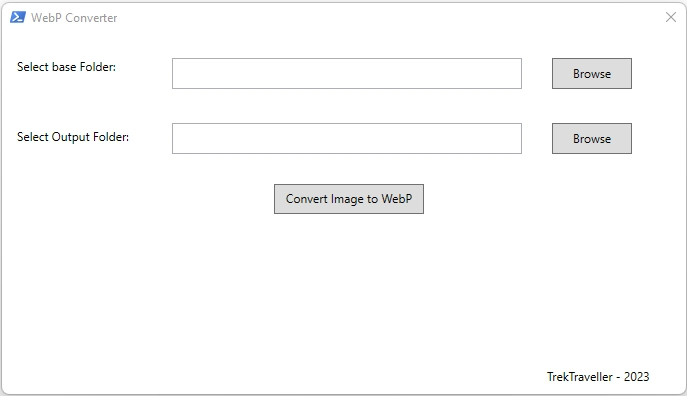
Supported Formats
.JPG / .JPEG
.PNG
.BMP
.TIFF / .TIF
.HEIC
→ .WEBP
What's New in V3.0
NEW Async Processing — Background conversion via PowerShell Runspace; UI stays fully responsive during batch operations
NEW Cancel Button — Stop an in-progress conversion gracefully; shows count of files already processed
NEW Live Time Remaining — Estimated time remaining displayed below the progress bar, calculated from average time per file
NEW Image Resizing — Configurable Max Width / Max Height fields that maintain aspect ratio; the primary reason output can reach ~500 KB from a 12 MB source
NEW Resize Presets — One-click presets: 4K (3840×2160), FHD (1920×1080), HD (1280×720), Web (1024×768)
NEW Multi-file Drag & Drop — Drop multiple files at once; auto-switches to folder mode and queues all dropped files
Key Features
- Single File & Folder Batch Modes — Convert one file or an entire folder of images at once
- Recursive Subfolder Support — Optionally include images from all subfolders
- Quality Slider (0–100) — Fine-tune compression level to balance quality vs file size
- Drag & Drop — Drop files or folders directly onto the window
- HEIC Support — Converts Apple HEIC photos via intermediate TIFF conversion (requires Windows HEIF Extensions)
- Auto-detect cwebp.exe — Automatically searches common paths with manual override option
- Custom Output Folder — Save converted files to any location, or same as source
- Progress Bar & Status — Real-time conversion progress with file count and time estimates
- Setup & Usage Instructions for Windows PC -
Prerequisites
- Windows 10 or later (64-bit) with Windows PowerShell 5.1 or higher (pre-installed on Windows 10/11)
- Google's cwebp.exe — the command-line WebP encoder (downloaded in Step 1 below)
- For HEIC support only: Install HEIF Image Extensions from the Microsoft Store (free)
Step 1 — Download cwebp
Download libwebp-1.5.0-windows-x64.zip (64-bit executables for Windows) from the official Google WebP downloads page.
Download libwebp-1.5.0-windows-x64.zip (64-bit executables for Windows) from the official Google WebP downloads page.
Step 2 — Extract the archive
Right-click the downloaded ZIP file → Extract All → choose a location (e.g.,
Right-click the downloaded ZIP file → Extract All → choose a location (e.g.,
C:\Tools\libwebp). Inside you'll find bin\cwebp.exe — that's the file the converter needs.
Step 3 — Get the PowerShell script
Switch to the "Code" tab above and either:
Switch to the "Code" tab above and either:
- Click Download Script to save it directly as a
.ps1file, or - Click Copy Code, paste into Notepad, and save as
WebPConverter.ps1(make sure the file type is All Files (*.*), not .txt)
Step 4 — Update the cwebp.exe path (optional)
Open the
Change it to point to your extracted
Alternatively, the tool will auto-detect cwebp.exe if it's in the same folder as the script, in your system PATH, or in common install locations.
Open the
.ps1 file in any text editor. Near the top, find the line:$customPath = "C:\Users\Administrator\Desktop\WebPConverter\libwebp-1.3.0-windows-x64\..."Change it to point to your extracted
cwebp.exe location. Alternatively, the tool will auto-detect cwebp.exe if it's in the same folder as the script, in your system PATH, or in common install locations.
Step 5 — Run the script
Right-click
If you see a script execution policy error, open PowerShell as Administrator and run:
Right-click
WebPConverter.ps1 → "Run with PowerShell".If you see a script execution policy error, open PowerShell as Administrator and run:
Set-ExecutionPolicy RemoteSigned -Scope CurrentUser then try again.
Step 6 — Configure conversion settings
- Verify or browse to cwebp.exe path in the Configuration section
- Adjust the Quality slider (0–100; default is 85)
- Enable Resize Options and set Max Width/Height or use a preset (4K, FHD, HD, Web)
Step 7 — Select images
Use Folder Mode to select a folder of images (with optional recursive subfolder scan), or switch to Single File Mode to pick one file. You can also drag and drop files or folders directly onto the window.
Use Folder Mode to select a folder of images (with optional recursive subfolder scan), or switch to Single File Mode to pick one file. You can also drag and drop files or folders directly onto the window.
Step 8 — Set output folder
Browse to an output folder, or leave it empty to save WebP files alongside the originals.
Browse to an output folder, or leave it empty to save WebP files alongside the originals.
Step 9 — Convert!
Click "Start Conversion". The progress bar shows real-time progress with estimated time remaining. Use the Cancel button if you need to stop mid-conversion.
Click "Start Conversion". The progress bar shows real-time progress with estimated time remaining. Use the Cancel button if you need to stop mid-conversion.
Step 10 — Check results
A summary dialog will show how many files were successfully converted and any errors. Check your output folder for the
A summary dialog will show how many files were successfully converted and any errors. Check your output folder for the
.webp files.
Pro Tips
- For web-optimized images, use the FHD (1920×1080) or Web (1024×768) resize presets with quality around 80–85
- A 12 MB source image can be reduced to ~500 KB or less with resizing enabled
- The UI remains fully responsive during conversion — you can continue to browse or work while files are being processed
- To convert Apple HEIC photos, install the free HEIF Image Extensions from the Microsoft Store first
WebP Converter V3.0 — PowerShell Script
Download Script (.ps1)File size: ~15 KB • Requires: Windows PowerShell 5.1+ • License: Free to use